Buying a Used Gaming Laptop in the UK: What Your Consumer Rights Cover and What to Check Before Paying
A used gaming laptop around 500 can be a bargain, or it can be a very expensive lesson. The difference usually comes down to who sold it, what you checked, and what you kept on record. This guide covers your rights, an inspection routine, and what to do if the laptop is faulty.
It depends on who is selling. A business owes you far more than a private individual does.
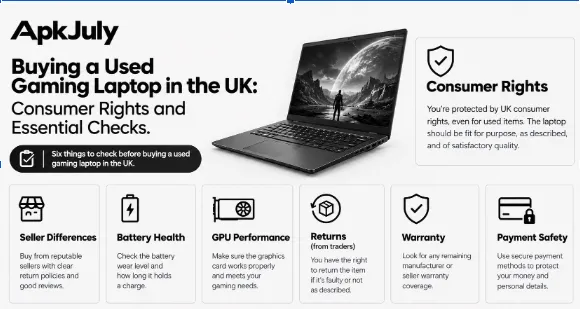
When you buy from a trader, the laptop must be of satisfactory quality, fit for purpose and as described. Used goods needn't match new ones, but a dead hinge or failing fan is not normal wear.
If the listing says RTX 3060 and a different GPU turns up, that's a clear mismatch.
A private seller isn't bound by the Act in the same way. The laptop must be as described and the seller must own it, but they needn't volunteer faults. Calling a worn laptop "like new" would breach the contract.
Someone who sells laptops regularly may count as a trader, whatever their profile says. Posing as a private seller is unlawful, and you can report it to Trading Standards.
Marketplace buyer-protection policies are separate from your legal rights, so check who you're dealing with.
Not to a trader. A blanket "no refunds" notice can't remove your statutory rights. But it doesn't make every used laptop returnable, and a disclosed fault won't help your claim.
Often, if a trader sold it and the fault is genuine.
If the laptop is faulty or not as described, you generally have 30 days from delivery to reject it for a full refund. It isn't a change-of-mind policy. You may need to show the fault was there from the start.
Ask for a repair or replacement in that window and the clock pauses, leaving you the rest of the 30 days, or seven days, whichever is longer.
After 30 days, the first remedy is usually repair or replacement. A refund or price reduction follows only if that fails. For roughly six months, the fault is presumed to have been there at delivery. After that, you must prove it.
This is separate. For most distance purchases from traders, you can cancel for any reason from the moment you order until 14 days after delivery. Exceptions exist, and in-person purchases don't automatically carry this right.
One right covers faults. The other covers second thoughts.
Inspect in person where you can. Buying remotely? Ask for photos and videos.
Specifications. Open Windows system information and confirm the CPU, GPU, RAM and storage against the listing. A "gaming" sticker proves nothing.
Screen and chassis. Look for dead pixels, flicker, loose hinges, dead keys and damaged ports. A wobbling hinge can point to a drop.
Battery and charger. Run a Windows battery report. A swollen battery is a safety problem, so walk away.
Cooling. Listen to the fans and watch temperatures under load. Gaming laptops run hot, so one high reading isn't a verdict. Crashes and severe throttling are.
Storage and ports. Check SSD health, then test Wi-Fi, USB, HDMI and the webcam.
Locks. Confirm Windows is activated, there's no BIOS password and no company or school still manages it.
Test as demanding a game as possible, with a target time of between 10 and 15 minutes. Note that a laptop would happily boot but still crumble under load. Watch out for crashes, glitches, stutters, or screaming fans. Don't judge by just the GPU name because the real performance is dictated by power limits, cooling, VRAM, etc. Research benchmarks for that exact model.
Sometimes, depending on what you compare it with.
| Private seller | Refurbished trader | New budget laptop | |
| Price | Often negotiable | Varies by grade | Varies by spec |
| Protection | More limited | Trader rights apply | Trader rights apply |
| Warranty | Often none | Depends on terms | Manufacturer plus seller |
"Refurbished" isn't a quality guarantee, so find out what the seller tests and covers.
Then do the sums. A gaming laptop around 500 is only a bargain once you add everything up: price, plus upgrades, plus likely repairs. A £450 laptop needing a £60 charger and a £40 battery is really a £550 laptop.
Take care regarding attractive prices, details that don't correspond to the item, and a suspicious refusal to provide images. A pressure to pay at once and strange methods of payment can indicate fraud.
One strange point isn't necessarily a sign of fraud, but three or four indicates that you need to be cautious. Ask for verification of the purchase and track the number, though this won't give you guarantees either.
Three habits can protect you: understand who the seller is, get a working model of your device tested, and take good notekeeping seriously. If there is a reason for suspicion why checks cannot be performed, just walk away.
Even with its low budget level, the best gaming laptop under £500 can be worth buying if the seller is transparent, and the laptop clears your tests. Use the APKJuly guide to the best gaming laptop around £500 in the UK to compare your shortlisted laptop models before purchasing.

This post has been authored and published by one of our premium contributors, who are experts in their fields. They bring high-quality, well-researched content that adds significant value to our platform.